About
ResumeForge parses section headings from a plain UTF-8 text file, applies styles defined in an .rcss file, and outputs a paginated A4 PDF. Supports single-column and 2-column grid layouts.
Installation
Clone the repository and install in editable mode:
git clone git@github.com:JohnStrong/ResumeForge.git
cd ResumeForge
python3 -m venv .venv
source .venv/bin/activate
pip install -e .
Source: github.com/JohnStrong/ResumeForge
Commands
validate working
Validate an RCSS style file for syntax errors. Reports the first error with line and column number.
resumeforge validate --style resume.rcssrender working
Render a plain-text CV to a styled PDF using an RCSS style file.
resumeforge render --input resume.txt --style resume.rcss --output resume.pdfversion working
resumeforge versionRCSS DSL
RCSS is a minimal CSS-like language with three selector types:
@font-face { ... }— custom font registration (optional)layout { ... }— page-level settings (mode, columns, margins, font)section[name="HEADING"] { ... }— per-section styles matched by heading text
Font face properties
Used inside @font-face { ... } (optional — falls back to Helvetica):
font-family— font family name to register (e.g."Carlito")src— path to regular weight TTF (e.g."fonts/Carlito-Regular.ttf")src-bold— path to bold weight TTF (e.g."fonts/Carlito-Bold.ttf")
Layout properties
Used inside layout { ... }:
mode—singleorgridcolumns— number of columns (grid mode, currently2)column-widths— width of each column as percentages (grid mode, must sum to 100%, e.g.30% 70%)column-gap— gap between columns (e.g.6mm)margins— page margins: top right bottom left (e.g.20mm 18mm 20mm 18mm)font-family— default font family (e.g."Helvetica")
Heading properties
Used inside heading { ... } (optional — styles the resume header. If omitted, ATS-friendly defaults are applied):
font-size— name/first line font size (default:20pt). Subsequent lines (contact info, title) are scaled down proportionallyalign— text alignment:left,center,right(default:center)line-height— line height in mm (default:7)color— text color in hex (default: black)
Section properties
Used inside section[name="..."] { ... }:
Style (applied as PDF state before writing):
font-size— text size (default:11pt)color— text color in hex (default: black)background-color— section fill color in hex (default: none)
Write (control how content is rendered):
align—left,center, orright(default:left)line-height— line height in mm (default:5)display—block(multi-line wrap) orinline(horizontal flow) (default:block)
Layout positioning (grid mode only):
grid-column—1or2(required in grid mode)padding— inner spacing (default:0)width— proportional column width (default:1fr)
layout { mode: grid; columns: 2; column-widths: 30% 70%; column-gap: 6mm; margins: 20mm 18mm 20mm 18mm; }

section[name="HEADER"] { grid-column: 1; padding: 8mm; align: center; }
section[name="EXPERIENCE"] { grid-column: 2; padding: 6mm; font-size: 12pt; }
Showcase
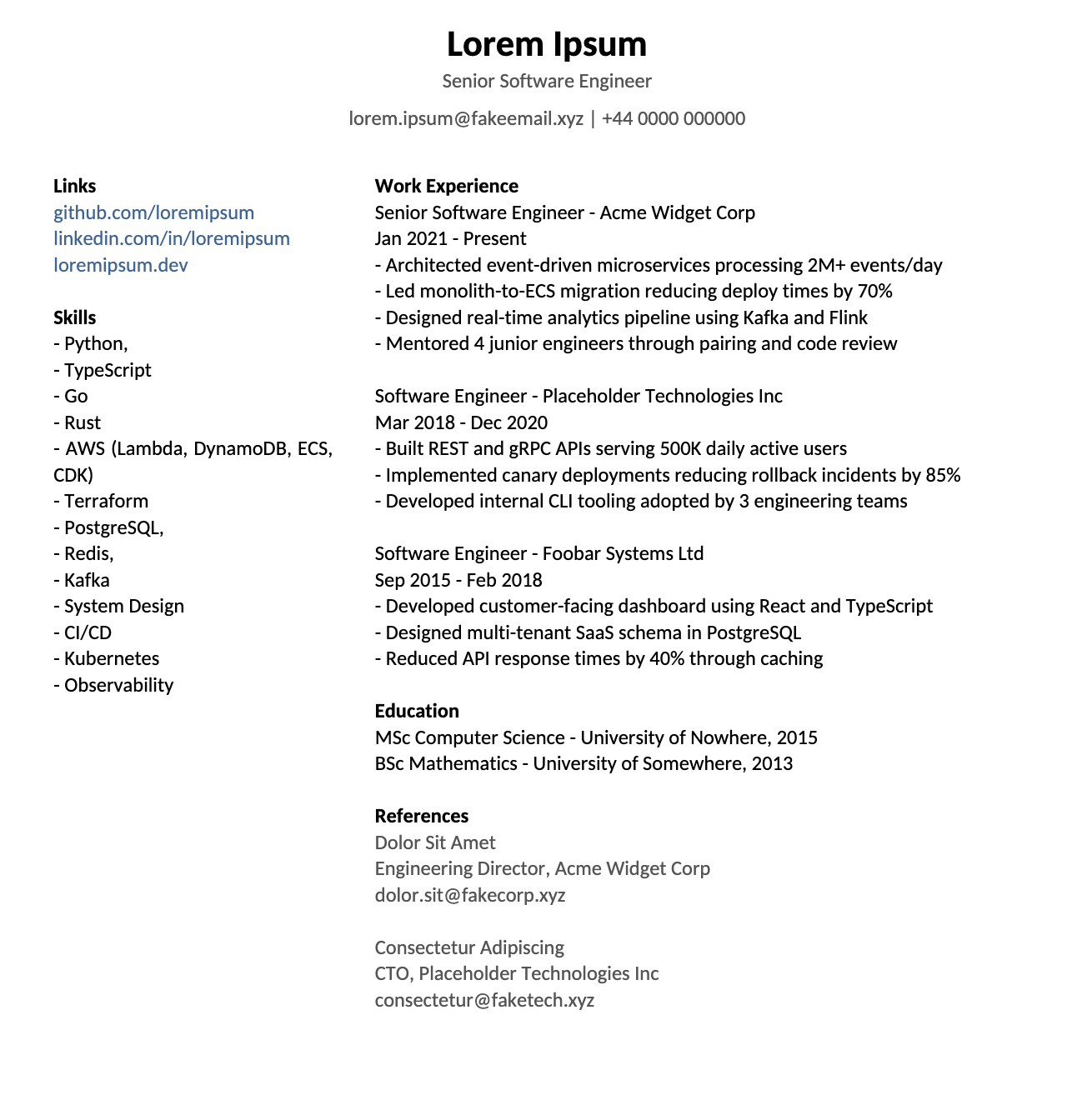
1. Write your CV as plain text
Lorem Ipsum
Senior Software Engineer
lorem.ipsum@fakeemail.xyz | +44 0000 000000

Links
github.com/loremipsum
linkedin.com/in/loremipsum
loremipsum.dev

Skills
- Python,
- TypeScript
- Go
- Rust
- AWS (Lambda, DynamoDB, ECS, CDK)
- Terraform
- PostgreSQL,
- Redis,
- Kafka
- System Design
- CI/CD
- Kubernetes
- Observability

Work Experience
Senior Software Engineer - Acme Widget Corp
Jan 2021 - Present
- Architected event-driven microservices processing 2M+ events/day
- Led monolith-to-ECS migration reducing deploy times by 70%
- Designed real-time analytics pipeline using Kafka and Flink
- Mentored 4 junior engineers through pairing and code review

Software Engineer - Placeholder Technologies Inc
Mar 2018 - Dec 2020
- Built REST and gRPC APIs serving 500K daily active users
- Implemented canary deployments reducing rollback incidents by 85%
- Developed internal CLI tooling adopted by 3 engineering teams

Software Engineer - Foobar Systems Ltd
Sep 2015 - Feb 2018
- Developed customer-facing dashboard using React and TypeScript
- Designed multi-tenant SaaS schema in PostgreSQL
- Reduced API response times by 40% through caching

Education
MSc Computer Science - University of Nowhere, 2015
BSc Mathematics - University of Somewhere, 2013

References
Dolor Sit Amet
Engineering Director, Acme Widget Corp
dolor.sit@fakecorp.xyz

Consectetur Adipiscing
CTO, Placeholder Technologies Inc
consectetur@faketech.xyz
2. Style it with RCSS
@font-face { font-family: "Carlito"; src: "examples/fonts/Carlito-Regular.ttf"; src-bold: "examples/fonts/Carlito-Bold.ttf"; }

layout { mode: grid; columns: 2; column-widths: 30% 70%; column-gap: 6mm; margins: 20mm 18mm 20mm 18mm; font-family: "Carlito"; }

heading { font-size: 20pt; align: center; line-height: 7; color: #555555; }

section[name="Links"] {
  color: #336699;
  line-height: 5;
  grid-column: 1;
}

section[name="Skills"] {
  line-height: 5;
  grid-column: 1;
}

section[name="Work Experience"] {
  line-height: 5;
  grid-column: 2;
}

section[name="Education"] {
  line-height: 5;
  grid-column: 2;
}

section[name="References"] {
  color: #555555;
  line-height: 5;
  grid-column: 2;
}
3. Render to PDF
resumeforge render --input examples/resume.txt --style examples/valid.rcss --output examples/resume.pdfResult
Troubleshooting
Invalid selector in your .rcss file. Only layout { }, heading { }, @font-face { }, and section[name="..."] { } are valid.
A property declaration is missing its trailing semicolon. Every declaration must end with ;
Your stylesheet has no layout block. Every .rcss file requires one.
Your stylesheet defines a layout but no section rules. Add at least one section[name="..."] { } block.
The headings in your .txt file don't match any section[name="..."] values. Headings must match exactly (case-sensitive, full line).
Your .txt file is missing a heading the stylesheet expects. Ensure every section[name="..."] has a matching heading line.
The section mapper received no parsed sections to style. This typically means your CV text was empty or contained no lines matching any stylesheet section names.
A section was parsed from the CV text but has no corresponding section[name="..."] rule in the stylesheet. Ensure every heading in your .txt file has a matching rule in the .rcss.
The percentage values in column-widths do not add up to 100. For example, column-widths: 30% 60%; totals 90%. Adjust so they equal 100%.
Each value in column-widths must be an integer followed by %. Decimal values like 33.3% and bare numbers like 35 are not allowed.
The layout adapter encountered an unrecognised property in layout { ... }. Valid properties: mode, columns, column-widths, column-gap, margins, font-family.
Your .txt file begins immediately with a section heading (e.g. Skills or Experience) with no name or contact information above it. Every CV must have at least one line of text before the first section — typically your full name, job title, and contact details (email, phone, LinkedIn). This heading block is rendered at the top of the PDF before any sections.